Photo Upload Guide: Best Lighting + Cropping for Custom Books
Upload a photo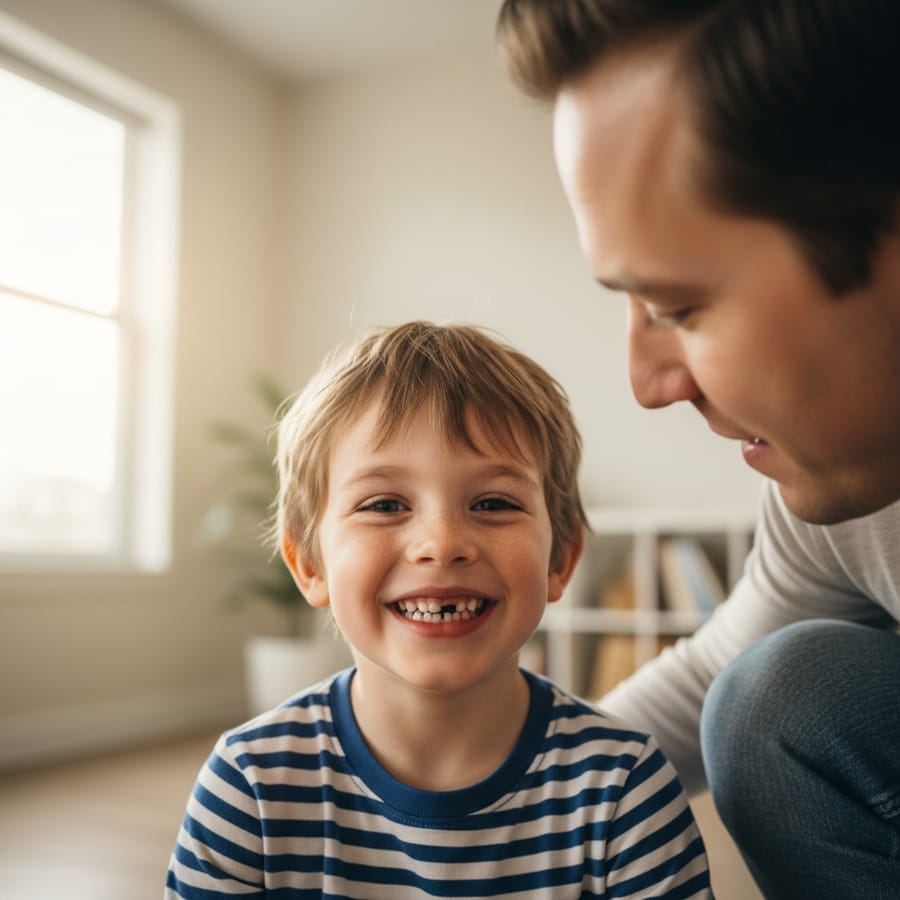
Imagine the look on your child’s face when they open a brand-new book and see themselves—not just a character who looks a little like them, but their uploaded photo—staring back from the pages of an epic adventure. At StorytimeHero.ai, we use advanced AI to turn your everyday snapshots into high-quality illustrations where your little one is the star. However, the secret sauce to making these illustrations look truly magical starts with you. Following a solid Photo Upload Guide: Best Lighting + Cropping for Custom Books is the most important step in ensuring your child’s digital hero looks exactly like the real-life hero you know and love. We want that transition from a smartphone photo to a hand-drawn-style illustration to be seamless, and that all begins with the quality of the image you provide.
Why Your Photo Quality Matters for the Best Custom Books
When you start the journey of creating a custom hero, our AI technology goes to work analyzing the unique features of your child’s face. It looks at the shape of their eyes, the curve of their smile, and even the way their hair falls. This process is incredibly detailed, but it relies entirely on the data it receives from your upload. If a photo is blurry, too dark, or taken from a strange angle, the AI might have to "guess" at some of those features. This is why a Photo Upload Guide: Best Lighting + Cropping for Custom Books is so essential; it helps you provide the clearest "map" possible for our technology to follow.
Think of it like a recipe. If you use the best ingredients, you get a five-star meal. If the ingredients are a little bit off, the final dish might still be okay, but it won't be spectacular. We want your child’s book to be spectacular. When the AI has a high-resolution, well-lit photo, it can create a character that captures your child’s essence perfectly. This makes the personalized children's books experience feel much more personal and impactful. When your child sees a version of themselves that looks "just right" in a professional illustration, it boosts their confidence and makes the story feel like a real-life possibility.
Beyond just the "look," high-quality photos ensure that the colors in the illustration are accurate. If you take a photo under a yellow indoor light, the AI might think your child has a different skin tone or hair color than they actually do. By following the tips in this Photo Upload Guide: Best Lighting + Cropping for Custom Books, you help us get the colors, textures, and features exactly right the first time.
Finding the Perfect Light: The Secret to Great AI Illustrations
Lighting is perhaps the single most important factor in any photography, but it is especially critical for AI face-mapping. The goal is to have "even" lighting across your child’s entire face. You want to avoid deep shadows or "hot spots" where the sun is hitting one side of their face too brightly.
The absolute best light source is natural, indirect sunlight. This is the kind of light you get on a slightly cloudy day or in a room with a large window that isn't receiving direct, harsh sunbeams. If you are indoors, have your child stand facing a window. You, the photographer, should have your back to the window. This allows the soft light to wash over their face, filling in shadows under the eyes and nose. This is a key tip in our Photo Upload Guide: Best Lighting + Cropping for Custom Books because it creates a clear, high-contrast image that the AI can easily read.
Here are a few lighting scenarios to avoid:
- The "Ghost" Look: Avoid using a camera flash in a dark room. This often washes out facial features and creates "red-eye," which makes it hard for the AI to see eye color.
- The "Noir" Look: Don't take photos where half the face is in deep shadow. If your child is standing sideways to a bright lamp, one side of their face will be dark, and the AI won't be able to see their features clearly.
- The "Dappled" Look: Avoid standing under a tree where sunlight is peeking through the leaves. This creates spots of light and dark across the face that can confuse the face-rendering software.
If you are struggling with lighting, try taking your child outside about an hour before sunset, often called the "golden hour." However, stay in a shaded area. The light is naturally warmer and softer then, which is perfect for personalized stories for kids.
Mastering Composition and Cropping for Your Child's Hero
Once you have the lighting figured out, the next step in our Photo Upload Guide: Best Lighting + Cropping for Custom Books is getting the right angle and crop. You don't need a professional camera for this; your smartphone is more than enough! The key is how you position the phone relative to your child.
First, get down on their level. If you are standing up and looking down at your child, the photo will be "foreshortened," meaning their forehead will look larger and their chin will look smaller. For the best AI results, hold the camera at your child’s eye level. This gives the AI a straight-on view of their facial proportions.
When it comes to the "crop" or the frame of the photo, we usually recommend a "bust" shot. This means the photo should include their head, neck, and the tops of their shoulders. You don't need a full-body shot because the AI is specifically focusing on the face to place it onto the hero in the book.
- Leave some "breathing room": Don't crop the photo too tightly around the face before you upload it. It’s better to have a bit of background showing around the head so our system has room to work.
- Face the camera: While "candid" shots are cute, for a storybook hero, a direct or slightly angled look toward the camera works best.
- No "clutter" near the face: Make sure there aren't hands, toys, or pieces of food near the child’s face. If your child is eating a cracker in the photo, the AI might think the cracker is part of their jawline!
Following these composition rules in the Photo Upload Guide: Best Lighting + Cropping for Custom Books ensures that the character in the book has the same facial structure as your child, making the how it works process much more successful.
Choosing the Right Expression: Smiles, Smirks, and Wonder
What kind of hero is your child? Are they a brave knight, a curious explorer, or a magical fairy? The expression on their face in the photo you upload will influence the "vibe" of the illustrations in their custom book. While our AI is great at adapting faces to different scenes, the base expression you provide sets the tone.
A natural, soft smile is usually the best choice. It’s versatile and works well whether the character is meeting a friendly dragon or discovering a hidden treasure. If your child has a very "toothy" grin, that’s great too! It adds a lot of personality. Just try to avoid "silly faces" where the eyes are squinted shut or the mouth is distorted, as this can make the final illustration look a bit less like them.
Think about the story you are choosing. If it’s a high-energy adventure, a big smile is perfect. If it’s a more thoughtful or magical tale, a calm, wide-eyed look of wonder can be really effective. We often suggest that parents take 5 or 6 photos and then pick the one where the child looks most "themselves." This is a big part of the unique gift ideas for kids experience—capturing that specific spark that makes your child who they are.
Common Mistakes to Avoid in Your Photo Upload Guide
We’ve seen thousands of photos, and we want to help you avoid the common pitfalls that lead to less-than-perfect illustrations. Even with the best intentions, a few small errors can make the AI’s job much harder. When you follow this Photo Upload Guide: Best Lighting + Cropping for Custom Books, keep an eye out for these "don'ts":
- Avoid Hats and Headbands: Unless you want your hero to wear a baseball cap in every single scene of the book (even in bed!), try to take the photo without headwear. Hats cast shadows on the forehead and hide the hairline, which the AI needs to see to create a natural look.
- Watch Out for Glasses: If your child wears glasses every day, by all means, keep them on! However, be very careful about "glare." If the camera flash or a window reflects in the lenses, the AI won't be able to see your child's eyes.
- No Blurry Photos: This sounds obvious, but kids move fast! If the photo is even slightly blurry, the AI will produce a blurry illustration. Use a fast shutter speed or take the photo in bright light to keep things sharp.
- Avoid Low-Resolution Screenshots: Sometimes parents try to upload a screenshot of a photo from social media. These are often "compressed," meaning they’ve lost a lot of detail. Always try to upload the original file directly from your phone’s camera roll.
- One Person Only: Make sure your child is the only person in the photo. If there is a sibling’s head peaking in or a parent holding the child, the AI might get confused about which face to use.
By steering clear of these issues, you are ensuring that your personalized children's books turn out as high-quality as possible.
Practical Steps: How to Take the "Pro" Photo at Home
You don't need to be a photographer to get a great shot. Here is a simple, step-by-step routine you can follow to get the perfect image for your Photo Upload Guide: Best Lighting + Cropping for Custom Books.
- Step 1: The Window Trick. Find the brightest window in your house during the daytime. Open the curtains or blinds fully.
- Step 2: The Setup. Have your child stand or sit about 3 feet away from the window, facing it. You stand between the window and the child, but move slightly to the side so you don't block their light.
- Step 3: The Interaction. Don't just tell them to "say cheese." That often leads to forced, stiff smiles. Instead, tell a quick joke, make a funny sound, or ask them a question about their favorite animal.
- Step 4: The Burst. Use the "burst mode" on your phone. Hold down the shutter button as they laugh or react. This gives you 10-20 photos to choose from, and usually, one of them will have the perfect lighting and expression.
- Step 5: The Quality Check. Zoom in on the photo on your phone screen. Can you see the individual eyelashes? Is the color of the eyes clear? If yes, you’ve got a winner!
This simple process takes less than five minutes but makes a world of difference in the final product. Your child deserves to be a hero, and these steps ensure they look like the best possible version of themselves in their new adventure.
Frequently Asked Questions
What file formats do you accept for uploads?
We accept most standard image formats, including JPEG, PNG, and HEIC (the standard iPhone format). As long as the file is clear and high-resolution, our system can handle it.
Can I upload a photo of my child wearing a costume?
It’s usually better to avoid costumes for the initial photo. The AI will be "dressing" your child in the hero's outfit (like a space suit or a knight's armor) within the book. A simple, solid-colored shirt is the best choice for the photo upload.
My child has long hair. Should I tie it back?
It’s best to leave their hair down or styled however they normally wear it. The AI uses the hair in the photo to help create the character's look. If the hair is tied back tightly, the hero in the book might appear to have shorter hair than your child actually does.
Does the background of my photo matter?
Not really! Our AI is very good at "cutting out" the child’s face and shoulders. However, a plain background (like a white or light-colored wall) is helpful because it prevents any colors from the background from reflecting onto your child’s skin.
Can I use a photo where my child is a baby for an older child's book?
We recommend using a current photo. The AI captures the child as they look in the image. If you use a baby photo, the hero in the story will look like a baby, even if the character in the book is performing "big kid" tasks like riding a horse or flying a plane.
What if the photo I upload isn't good enough?
Don't worry! If our team or the AI determines that the photo quality is too low to create a great illustration, we will reach out to you and ask for a new one. We want you to be 100% happy with your personalized children's books.
Related Reading
- The Power of Representation in Children's Literature
- How to Choose the Right Adventure for Your Child
- The Science Behind AI-Generated Illustrations
- Making Bedtime Magic: Tips for Reading Aloud
- Why Personalized Books Are the Best Birthday Gifts
- Top 5 Themes Kids Love in Storytime Hero Books
- Helping Your Child Develop a Love for Reading
- The Evolution of Storytelling: From Paper to AI
Free preview checklist
Get the personalized book gift checklist
Know what photo to use, what to write in the dedication, and what to review before ordering.